Bootstrap을 이용한 버튼을 for문을 이용한 반복생성할 경우
쿼리스트링으로 Modal로 전달하게 되면 반복문의 첫번째 전달값만으로 전달이된다.
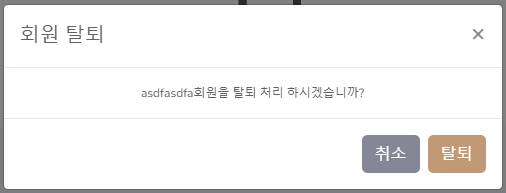
따라서 반복문을 통해 생긴 각 버튼의 전달값을 Modal의 부모창으로 전달하고,
부모창에서 받아온 전달값을 쿼리스트링을 이용해 JSP 문서로 다시 전달하여 사용할 수 있다.
<div class="modal fade" id="exampleModal" tabindex="-1" role="dialog" aria-labelledby="exampleModalLabel" aria-hidden="true">
<div class="modal-dialog" role="document">
<div class="modal-content">
<div class="modal-header">
<h5 class="modal-title" id="exampleModalLabel">회원 탈퇴</h5>
<button type="button" class="close" data-dismiss="modal" aria-label="Close">
<span aria-hidden="true">×</span>
</button>
</div>
<div class="modal-body">
<h1 class="form-control-plaintext" id="userid"></h1>
</div>
<div class="modal-footer">
<button type="button" class="btn btn-secondary" data-dismiss="modal">취소</button>
<button type="button" class="btn btn-primary" id="removeBtn2">탈퇴</button>
</div>
</div>
</div>
</div>
<script>
$('#exampleModal').on('show.bs.modal', function (event) {
var button = $(event.relatedTarget) // Button that triggered the modal
var m_userid = button.data('whatever') // Extract info from data-* attributes
// If necessary, you could initiate an AJAX request here (and then do the updating in a callback).
// Update the modal's content. We'll use jQuery here, but you could use a data binding library or other methods instead.
var modal = $(this)
modal.find('.modal-body').text(m_userid + '회원을 탈퇴 처리 하시겠습니까?')
$('#removeBtn2').click(function() {
location.href="member_status_action.jsp?m_userid="+m_userid
})
})
</script>
'TeamProject' 카테고리의 다른 글
| 파이널프로젝트 - 1 (0) | 2022.02.15 |
|---|---|
| 세미프로젝트 - 종료 (0) | 2022.02.13 |
| [Semi-Prj] Multipart/form-data와 쿼리스트링 (0) | 2022.01.30 |
| [Semi-Prj] JSP 요청 응답 명령 (0) | 2022.01.28 |
| Team Project - 1 (0) | 2021.12.29 |